|
MyAssistant Tasks monitor for specific situations in Sage using a Condition. Conditions are one or more logical statements that are true or false. For example:
To See
|
MyAssistant Condition
|
Jobs that are over-budget
|
JC Jobs with a Total Estimate greater than the Job-to-date Costs
|
Subcontracts that are not signed
|
JC Commitments where the "Signed Received" box isn't checked and the Vendor's Type is "Subcontractor"
|
AP Invoices Coded to a JC Cost Code without an Estimate
|
AP Invoice Distributions where the associated JC Cost Code's "Total Estimate" is zero
|
PR Employees paid this pay period
|
PR Checks with a period end date in the last week and a Direct Deposit amount greater than zero
|
When a Task runs, the Condition is applied to the Sage database and creates a list of Sage records. This list can be:
▪Included in the body of the email
▪Used to fill in a spreadsheet template, or
▪Used as a mailing list to send each recipient their reports or documents
Click here for a table that helps identify what record information is stored in based on where it's viewed or entered in Sage.
Condition Parts
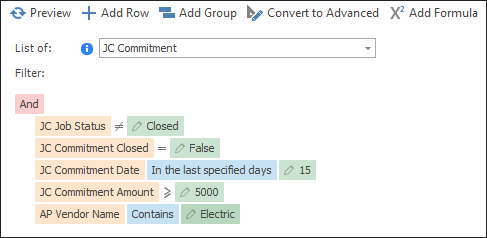
Each line of a Condition contains the following pieces:
Sage field/MyAssistant Formula: The information from a Sage field or a MyAssistant Formula. Examples include:
▪Employee's Email Address
▪Invoice Date on an AR Invoice
▪Last time a Job was billed
Operands: Used to compare the different values on a line. Examples include:
▪Equals 
▪Is more than specified days ago 
▪Is greater than 
▪Contains 
▪Is blank 
Related: All available operands
A specified value, Sage field or Formula: This is what's compared against the Sage field or MyAssistant Formula value in the line. This could be:
▪$4,000
▪30 days
▪Accounting Date on an Invoice
▪Percent a category is over-budget
When put together, Condition rows look like the following:
|
Tip: When running a Task to send each person only their information, the Condition will also help determine who should be emailed and who shouldn't. Click here for more information.
|
Related: Building a Condition
|

