|
The Sort on a Spreadsheet Template controls the order Sage information (for example: Jobs, Vendors, etc.) is listed in the spreadsheet, as well as how information can be grouped.
A Sort order can only be specified on a spreadsheet template after a Repeat Section has been added to a Spreadsheet Template.
The dropdown list of available fields to sort a spreadsheet template will always prefill with the Sage fields that have already been added to a Spreadsheet Template. Sage fields not in the spreadsheet template can be used by selecting "More Fields..." at the bottom of the dropdown.
This outlines the steps to update the Sort of a spreadsheet Template. Depending on the spreadsheet(s) being sent by the Task, some steps may be skipped. These steps begin after opening the Spreadsheet Template in the Email Step of Task Setup:
1.Open the Sort window: Click on a cell in the Repeat section, then click the Sort button in the ribbon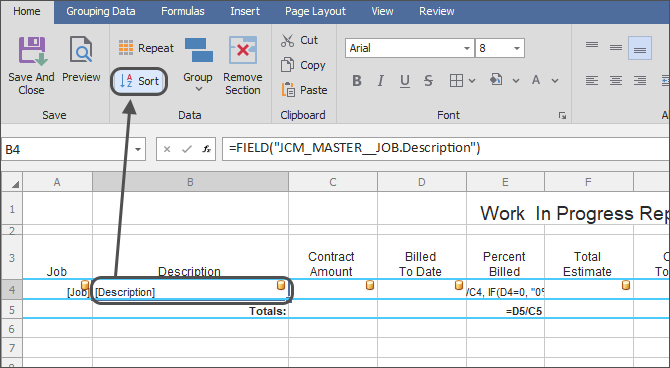
2.Remove sorts: Click the X to remove any fields or formulas being used to sort the Spreadsheet.
.png)
Removing a sort also removes any linked Group Headers or Footers
3.Add new sort fields: Click the "[None]" dropdown at the bottom of the list and select a field to add a new sort. Repeat with the new blank dropdown at the bottom of the list to add any further new sorts.
4.Change the Sort order: Use the up & down arrows and the "Ascending" & "Descending" options for each row to rearrange the Sort order of the Spreadsheet Template
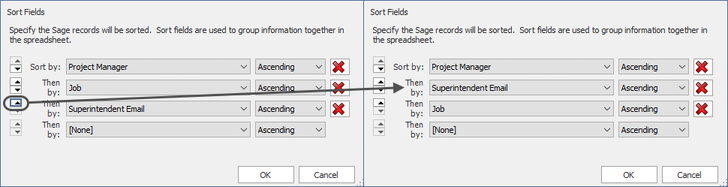
5.Click "OK" when finished
|
Note: After changing the Sort order, any Group Headers & Group Footers already in the spreadsheet will automatically update based on the new Sort.
For example: If a spreadsheet of Subcontracts previously sorted & grouped by Project Manager and Job were changed to sort by Job and Vendor, the group headers and footers in the template would automatically update to group the spreadsheet by Job and Vendor.
|
Related Links
Send a Spreadsheet Overview
What to Send - Send a Spreadsheet
Email a Spreadsheet
Repeat Section
Grouping
Document Headers & Footers
Totals
Import & Export Spreadsheet Templates
|

