|
Task Conditions contain one or more Groups to distinguish required and optional criteria. There are two types of Groups:
"AND" Groups: All criteria in the group must be met
"OR" Groups: One of the criteria in the group must be met
For example:
▪Checking for current employees in multiple ways: An employee's Termination Date is blank, or their Termination Date is before the date entered in the Rehire Date field in PR Employee Setup
▪Checking for insurance information that was never entered, is expired, or is expiring soon: The General Liability "Ins Proof Req" checkbox in AP Vendor Setup is checked, and either the insurance expiration date is blank or the expiration date is in the next 30 days or older
Add or Change Groups
Click "Add Group" at the top of the screen to add a group to the end of your Condition.
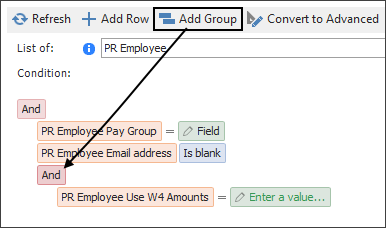
In addition to the group, the first line under the group is automatically added. You can change this line using the options outlined in Building a Condition.
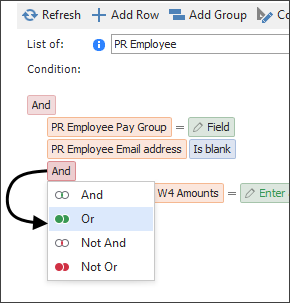
To change a group, click the "AND" or the "OR" above the lines of the Condition that you want to change, then select what you want to change it to:
|
Tip: Add groups to the end of a Condition to help stay organized as to what criteria is falling under which group. It's technically possible (though not advised) to have criteria from an outer group under an inner group, but always putting groups at the end of your criteria ensures conditions are easy to read.
|
Remove a group
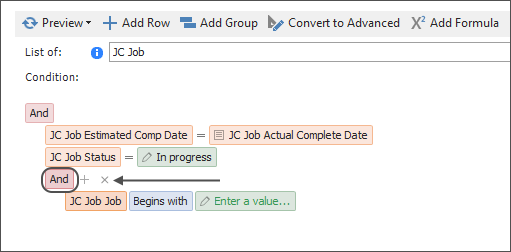
Remove a group from a Condition by hovering on the group heading, then clicking the "x" that appears to the right:
Understanding Groups
Criteria will always be indented under the group's heading, which most of the time will be an "AND" or an "OR" heading.
"AND" group only
If your Condition only has rows under an "AND" group, information being looked up in Sage must meet all listed criteria:
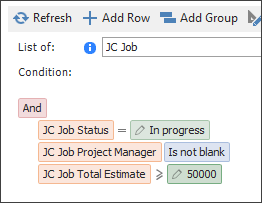
What this means: This Condition creates a list of Jobs that meet all of its criteria:
▪The Job's Status field is "In progress", and
▪The Project Manager field on the Job is not blank, and
▪The Total Estimate on the Job is greater than or equal to $50,000
If a Job does not meet all criteria, it is excluded from the Condition's results.
"OR" group only
If your Condition only has rows under an "OR" group, information being looked up in Sage must meet at least one of the criteria listed:
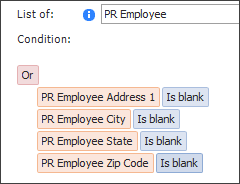
What this means: This Condition creates a list of any Employees where:
▪The "Address 1" field in Employee Setup is blank, or
▪The "City" field in Employee Setup is blank, or
▪The "State" field in Employee Setup is blank, or
▪The "Zip Code" field in Employee Setup is blank
Employees that don't meet any of the criteria will be excluded from the Condition's results.
"AND" group with an "OR" group underneath
Sometimes a Condition will have both required and optional. In this case, use both an "AND" and an "OR" group. When an "OR" group is underneath an "AND" group, all criteria under the "AND" group and at lease one criteria under the "OR" group must be met:
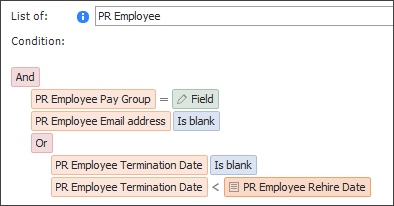
What this means: This Condition creates a list of Employees where:
▪The Employee is in the "Field" pay group, and
▪The "Email Address" field in Employee Setup is blank, and
▪Either
▪The "Termination Date" field in Employee Setup is blank, or
▪The "Termination Date" field is a date before the date in the "Rehire Date" field
Employees who do not meet the first two criteria and at least one criteria under the "OR" will be excluded from the Condition's results.
Multiple "AND" and "OR" groups
Conditions can have multiple groups underneath one another to create advanced criteria.
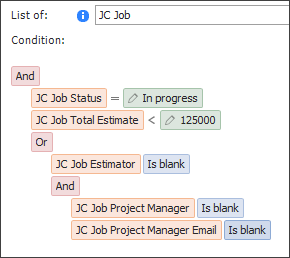
What this means: This Condition creates a list of Jobs that meet all criteria under the "AND" group and at lease one criteria under the "OR" group. In this case, the second "OR" option has two criteria that both must be met:
▪The Job's status is "In progress", and
▪The Total Estimate on the Job is less than $125,000; and
▪Either
▪Option 1: The "Estimator" field on the Job is blank, or
▪Option 2:
▪The "Project Manager" field on the Job is blank, and
▪The "Project Manager Email" field on the Job is blank
Jobs that do not meet the first two criteria and at least one complete criteria under the "OR" (i.e. Option 1 or Option 2) will be excluded from the Condition's results.
|

