|
This step is for entering information about the person using MyAssistant & what additional options, if any, they would like to enable.
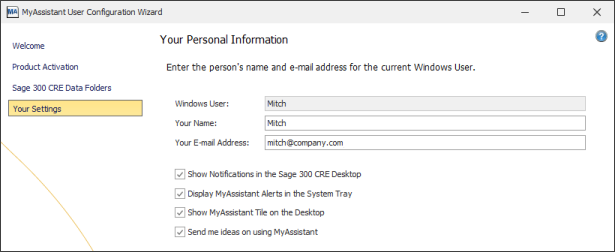
As part of the configuration you will fill out the following fields:
▪Your Name - The name of the person using MyAssistant
▪Your Email Address - Your email address
You'll also check or uncheck boxes for a number of additional settings:
▪Show Notifications in the Sage 300 Desktop – Controls if activated MyAssistant Tasks and their results (called "Notifications") appear in the Sage Desktop software in the Applications list
▪Display MyAssistant Alerts in the System Tray – Controls if MyAssistant appears in the Windows System Tray (i.e. the bottom-right section of the Windows task bar next to the current date and time)
▪Show MyAssistant Tile on the Desktop – Controls if the "MyAssistant Live Tile" appears on your Windows desktop. The Live Tile is a way to quickly look up information in Sage and run Tasks not on schedules without having to open the full MyAssistant software.
▪Send me ideas on using MyAssistant – Controls if you are emailed (at the address specified above) new ideas on how to use MyAssistant.
|

