|
|
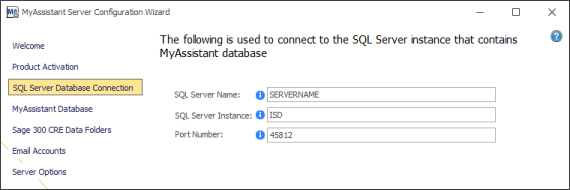
MyAssistant stores information about your Tasks, Task schedules, Email Directory information, copies of attached Crystal Reports and more in its own database. This database exists in a type of software called Microsoft SQL Server. This step of the Server Configuration is where you name the server where the SQL instance exists, the name of the SQL Server instance, and what port number should be used to connect to the database.
If MyAssistant is using the SQL Server instance that is installed as part of a normal MyAssistant installation, this information will be prefilled and the step will be skipped in the initial MyAssistant Server Configuration.
If the "Show Advanced Options" checkbox is checked on the first step of the MyAssistant Server Configuration, or you're using a different instance of SQL Server, you will need to confirm/enter the information required in this step.
Warning: It is strongly recommended that the information in this step is not changed. Changing any information could break the connection between the MyAssistant software and its database.
|
|
|

